
Category: Big Tech Breakup Time
You are viewing all posts from this category, beginning with the most recent.
Your "Normal Life" is Worth a Lot to Data Brokers
Knowing what you do, where you go, and who you’re with is very valuable to corporations.
If you’ve ever said/thought/commented something like:
- “I don’t have anything to hide, so I don’t care if they take my data”
- “I’m just a boring person what are they gonna do with my data?”
- “There’s nothing interesting about my data, so, whatever”
…then you aren’t alone; a lot of people say this. But the truth is, an average “nothing-to-hide” life is incredibly lucrative to the right people.
I’ve used the same iPhone for four years. It has 36 apps installed:
- 16 from Apple / stock on the phone
- 8 from Proton and Signal
- 2 for public transit systems
- 3 for parking meters, which is absurd
- 1 media app
- 1 internet browser
- 5 other various utility applications
I have locked down this phone as much as I possibly can by removing superfluous apps with trackers, opting for privacy-respecting and encrypted programs where possible, and setting up do-not-track requests. I even went through the settings with a fine-tooth comb turning off every possible location request that wouldn’t render my phone a brick unable to contact cell towers.
This morning, I installed an app that monitors when an app pings a known tracker. It’s now mid-afternoon, and I’ve barely used this phone today. We’re up to 125 tracking requests.
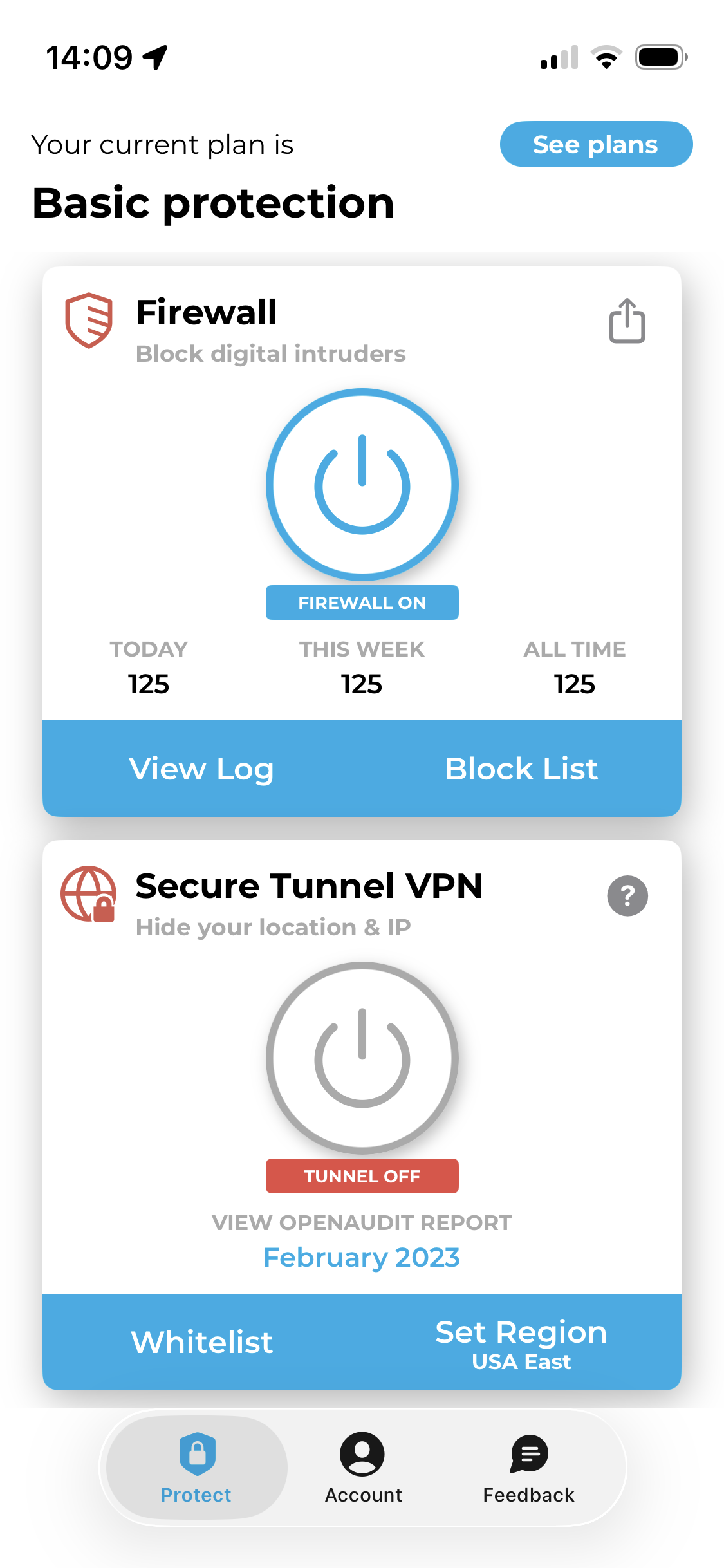
At the same time, I was actively using another phone that I’m testing. It’s a refurbished Pixel with open source GrapheneOS installed. There are 40 apps on this phone:
- 16 stock/phone management apps
- 4 map and transit apps
- 2 media apps
- 8 Proton and Signal apps
- 2 notes/docs apps
- 1 translation app
- 1 internet browser
- 1 YouTube client
- 1 Google app (Messages, not logged in)
- 3 other various utility apps
Through the morning I opened up mapping apps, checked train routes, listened to podcasts, watched a YouTube video, searched for things online, sent RCS and Signal messages to friends, checked my email, and installed an eSIM.
I monitored the tracker pings on this device, too. There were a whopping 13 of ‘em.
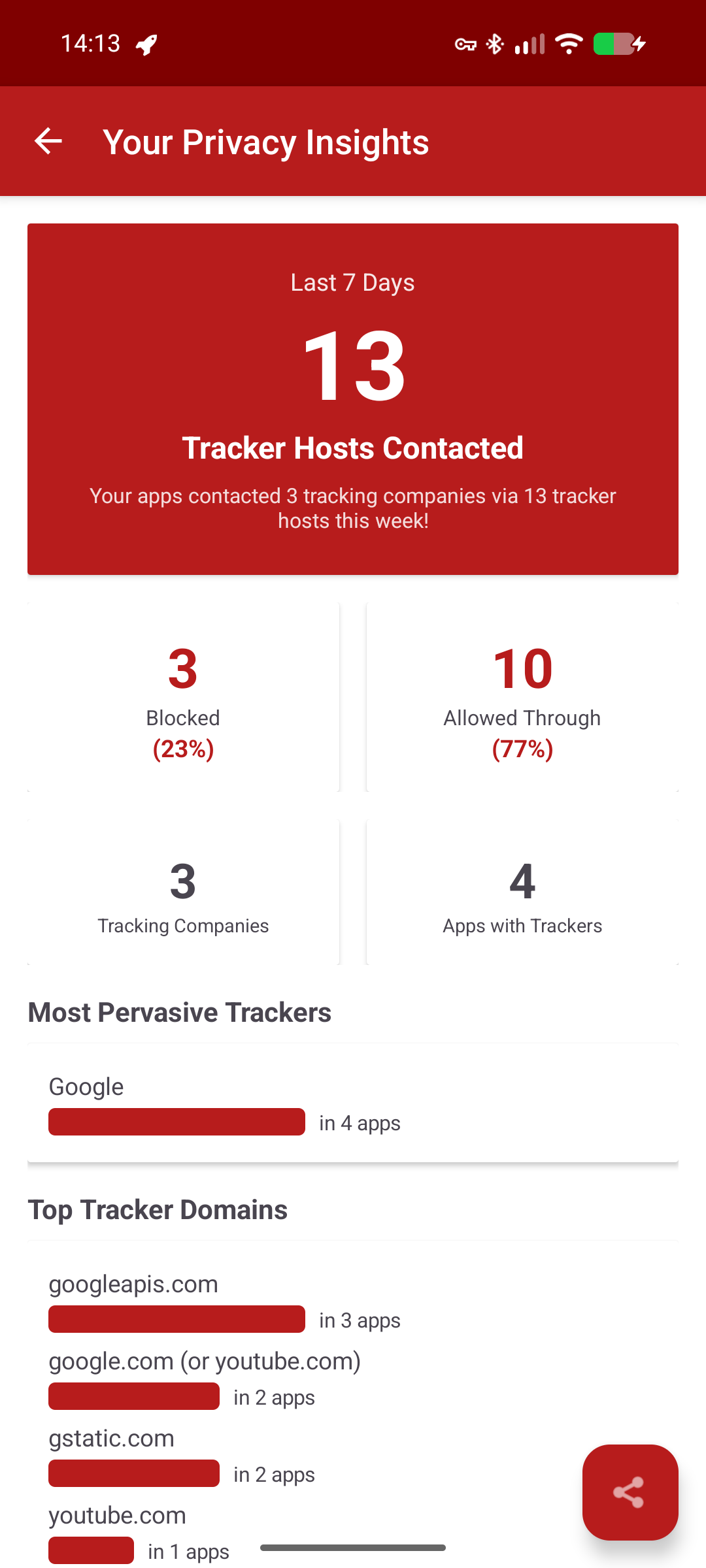
Both phones pinged content delivery networks (CDNs) and Firebase, which is used to deliver push notifications. And I expected my phone to contact YouTube when I was watching a YouTube video. But my iPhone contacted far more, including for several ad platforms:
- DoubleClick
- Amazon adsystem
- Outbrain
- TripleLift
- Innovid
- OpenX
- Adnxs
It also contacted Scorecard Research and Google Analytics (I expected that one).
My screen time on the iPhone so far? 37 minutes.
I’ve had iPhones for so long for three big reasons:
- I’ve had Mac computers since college
- It seemed like the “lesser evil” compared to Google’s tight fist on readily-available Android phones
- Apple doesn’t allow carrier bloatware on their phones (I don’t know how it is everywhere, but in the U.S., if you buy an Android phone from your phone carrier, it can come with various apps installed, including games, that you can not easily uninstall)
But as I’ve started to become more focused on my digital privacy over the past few years, I realized there were some other options that would give me more freedom from constant tracking. At this point, I’ve:
- Deleted all of my non-work social media accounts
- Largely stopped using Google products (I do use YouTube, and I have to maintain Google Search Console and Google Drive access for my business clients)
- Begun the shift to using alternative video calling platforms like Whereby and Proton Meet
- Asked friends and family to join me in Signal chats
Am I still tracked at all? Sure. Companies gather data on each and every one of us from all kinds of sources—the credit card purchases we make, the flights we take, and so forth.
But your actions online (and in internet-connected apps) are a big way in which a consumer profile is built around you. This profile then influences what ads you see, the kind of direct mail you get, and even what prices you’re given at some stores.
So yeah, your “average Joe” data is very financially valuable to companies that want to sell you products or charge you a certain price because it’s predicted that you REALLY NEED the specific thing you’re shopping for.
This isn’t to say you have to go off-grid. I haven’t. But it does mean that it’s worth a second thought when engaging with Big Tech platforms…and taking some steps to keep your “just an average person” data safer.
It was freeing when I quit Meta products. Even if you can’t give up every Meta app (I know WhatsApp is essential to many), quitting the Facebook machine feels damn good: medium.com/tired-of-…
New Reporting Shows Private Zoom Meetings Turned into AI Podcasts
Emanuel Maiberg of 404 media published a report looking at a website called WebinarTV that isn’t strictly webinars as the name implies.
Instead, as Maiberg found, WebinarTV publishes recordings of Zoom calls, then turns those calls into an audio podcast “hosted” by AI voices. Oh, and the catch? Not all of those Zoom calls were public.
According to Maiberg and a report by CyberAlberta, WebinarTV most likely gains access to recordings of obstensibly private (in that they weren’t recorded and published online by the real host) Zoom calls in one of two ways:
- Most likely: WebinarTV collects meeting room details (including access links) through browser extensions that automatically join the user’s Zoom calls and provide “AI notetaker services.” According to CyberAlberta, known extensions feeding data to WebinarTV include:
GoToWebinar and Meeting Download Recordings (published by meetingtv.us), AutoJoin for Google Meet, Meet Auto Admit, OtterAI, NottaAI
- Less likely: The WebinarTV scraper finds “click to RSVP” links for Zoom meetings on webpages, then registers a bot attendee. This “attendee” then captures the meeting content.
In both cases, the recording is a screen recording, not a meeting recording.
When you initiate meeting recording in a Zoom call, all participants get a notification that meeting recording has begun. This recording is then either stored on the host’s computer or in their Zoom cloud account, depending on the type of plan they have. It’s a video file of just the Zoom video content—speakers and slides shared during the call. (Transcripts and chat records can be available too, depending on the host’s settings, but these are separate files.)
But if an attendee screen records the call, nobody in the Zoom room knows. Screen recordings just capture the contents of your actual computer screen or a window on it. This includes a list of participants or the chat bar along the side of a Zoom call, if opened up on the recorded screen.
Are your Zoom meetings at risk?
Unfortunately, there’s not a lot that individual Zoom hosts can do to prevent this, largely because of how likely it is that WebinarTV is gaining access through attendees’ notetakers.
A decent, though not foolproof, way to handle this would be to:
- Don’t publish meeting RSVP links online. Send RSVP links directly to the people you want to invite, or invite them via a calendar event.
- Require that attendees type in a meeting passcode (vs. having Zoom automatically provide access to the meeting when a join link is clicked).
- Process attendees through a waiting room that requires a host to allow access.
- Tell all attendees up front that no AI notetaking plug-ins will be allowed to attend the meeting.
- Manually remove AI notetaking tools from the call as they’re added.
- Once the call starts, lock the meeting to prevent any other people or bots from joining.
This still doesn’t stop the attendees’ browser extensions from collecting information and it doesn’t completely guarantee that your meetings won’t be screen recorded.
It’s also a nearly impossible task to manually monitor, vet, and remove attendees during a very large group call.
And finally, there’s the fact that AI notetaking devices do offer accessibility benefits. In this case, it would be most “secure” for meeting hosts to capture the meeting recording, summary, and transcript using Zoom’s native tools, then share that with attendees afterward.
Why is WebinarTV doing this?
Money. This is entirely a money grab. WebinarTV sometimes sends emails to hosts whose meetings were uploaded and offers to “help” them “distribute” and “market” the content further…for a fee, of course.
There’s a lot of money in data, too, such as being able to gather (and sell) lists of email addresses affiliated with a particular event or group. I don’t have any proof that WebinarTV has done this, but it also wouldn’t surprise me at all.
Other video calling options
While Maiberg’s article and CyberAlberta’s report focus on Zoom, CyberAlberta does note that a similar risk could be present with other video-calling platforms. And the list of affected browser extensions clearly refers to some marketed to Google Meet users.
Again, while nothing is foolproof, the most popular video calling tools are often most likely to be vulnerable to attacks like this. There’s financial benefit for bad actors to learn how to breach highly popular tools—it gives them a lot of content to collect.
I began using an encrypted, European-based video calling app, Whereby, in 2024, though I still use Zoom for some meetings I host (and often have to join other people’s Zoom rooms, of course.) Whereby uses encrypted, locked rooms by default and isn’t as deeply integrated with calendar apps and extensions as Zoom is.
Whereby also offers a very simple, nice web-browser-based experience for its users. I’ve had multiple people join calls with me from their phone browser and comment on how nice the whole video call experience is.
And, of course, there’s always just good old phone calls. While “one party permission” call recording is allowed in some countries, provinces, and states, a phone call isn’t going to include any of your proprietary diagrams and slides for all to see.
For now, though, when I need to host a video call, I’ll be opting for the smaller-tech Zoom alternative found in Whereby.
My Year Without Amazon
My dalliance with Amazon started around 2014. Even though I worked in ecommerce at the time,I didn’t do much online shopping. But 2014 was the year I got a Kindle-and the Amazon account that went along with it.
I got Prime, I tried Kindle Unlimited, and all was grand for four years or so. But on a trip to Seattle, a flyer on a telephone pole caught my eye. It described horrible working conditions at Amazon—conditions that I’d been unaware of up until then.
My husband and I looked at the flyer, then at each other.
“We should use Amazon less,” we said.
Admittedly we didn’t pull the plug straight away, cold-turkey style. It was a gradual process, elongated by the pandemic. We canceled Prime, we canceled our Amazon credit card, and I got a different e-reader.
In 2021, I deleted my personal Amazon account. And in 2024, I deleted my business account, too. Today, I have no Amazon account, and I haven’t purchased anything on that site or app in over a year.
This isn’t to say that I only buy from perfect companies. I will get things at the Walmart, CVS Pharmacy, and Marshalls stores near my house. None of those companies are great—but I can’t get everything at the grocery store.
But getting out of the Amazon cycle has made me shop less as a whole. When I have to get in the car or pay for shipping,it gives me a pause. I do both of those things but I’m more likely to consolidate trips and orders.I’ve learned to stop and say “do I actually want to get this?”
As for how I’ve replaced Amazon, I’ve focused more on in-person shopping again. I use a Barnes & Noble Nook Glowlight e-reader. I buy secondhand
on Mercari and Thriftbooks. I’ve been using Etsy and eBay more, too, but you do have to watch for drop shippers—some of whom ship directly from Amazon.
I know there are some folks in circumstances where the fast delivery of so much provided by Amazon is the main or only way they can get essential goods. But if you have the ability to use a go to other stores, and you’re older than 30-ish, remember: you’ve done this before! You’ve shopped and lived in a world without Amazon Prime.
And you can do it again if you want to. I built a free tool to help you do it: just visit tiredof.tech and tap “Amazon” to get started.